一、版本升级
当我们要用到新版本的一些功能和特性的时候或者当前版本太旧无法满足需要的时候势必要对Kubernetes集群进行升级。
1.1、升级Master节点
1.1.1、腾空节点
[root@master ~]# kubectl get node
NAME STATUS ROLES AGE VERSION
master Ready control-plane,master 38h v1.22.0
node1 Ready <none> 38h v1.22.0
node2 Ready <none> 38h v1.22.0
# 安全的将master节点从集群驱逐
[root@master ~]# kubectl drain master --ignore-daemonsets
node/master cordoned
WARNING: ignoring DaemonSet-managed Pods: kube-flannel/kube-flannel-ds-lhm8v, kube-system/kube-proxy-lcn2b
evicting pod kube-system/coredns-7f6cbbb7b8-j7nr6
pod/coredns-7f6cbbb7b8-j7nr6 evicted
node/master evicted1.1.2、升级Kubeadm
[root@master ~]# yum -y install kubelet-1.23.17 kubeadm-1.23.17 kubectl-1.23.17
[root@master ~]# sudo systemctl daemon-reload
[root@master ~]# sudo systemctl restart kubelet
1.1.3、验证升级计划
[root@master ~]# kubeadm upgrade plan
[upgrade/config] Making sure the configuration is correct:
[upgrade/config] Reading configuration from the cluster...
[upgrade/config] FYI: You can look at this config file with 'kubectl -n kube-system get cm kubeadm-config -o yaml'
[preflight] Running pre-flight checks.
[upgrade] Running cluster health checks
[upgrade] Fetching available versions to upgrade to
[upgrade/versions] Cluster version: v1.22.0
[upgrade/versions] kubeadm version: v1.23.17
I0703 07:56:15.347208 8190 version.go:256] remote version is much newer: v1.30.2; falling back to: stable-1.23
[upgrade/versions] Target version: v1.23.17
[upgrade/versions] Latest version in the v1.22 series: v1.22.17
Components that must be upgraded manually after you have upgraded the control plane with 'kubeadm upgrade apply':
COMPONENT CURRENT TARGET
kubelet 2 x v1.22.0 v1.22.17
1 x v1.23.17 v1.22.17
Upgrade to the latest version in the v1.22 series:
COMPONENT CURRENT TARGET
kube-apiserver v1.22.0 v1.22.17
kube-controller-manager v1.22.0 v1.22.17
kube-scheduler v1.22.0 v1.22.17
kube-proxy v1.22.0 v1.22.17
CoreDNS v1.8.4 v1.8.6
etcd 3.5.0-0 3.5.6-0
You can now apply the upgrade by executing the following command:
kubeadm upgrade apply v1.22.17
_____________________________________________________________________
Components that must be upgraded manually after you have upgraded the control plane with 'kubeadm upgrade apply':
COMPONENT CURRENT TARGET
kubelet 2 x v1.22.0 v1.23.17
1 x v1.23.17 v1.23.17
Upgrade to the latest stable version:
COMPONENT CURRENT TARGET
kube-apiserver v1.22.0 v1.23.17
kube-controller-manager v1.22.0 v1.23.17
kube-scheduler v1.22.0 v1.23.17
kube-proxy v1.22.0 v1.23.17
CoreDNS v1.8.4 v1.8.6
etcd 3.5.0-0 3.5.6-0
You can now apply the upgrade by executing the following command:
kubeadm upgrade apply v1.23.17
_____________________________________________________________________
The table below shows the current state of component configs as understood by this version of kubeadm.
Configs that have a "yes" mark in the "MANUAL UPGRADE REQUIRED" column require manual config upgrade or
resetting to kubeadm defaults before a successful upgrade can be performed. The version to manually
upgrade to is denoted in the "PREFERRED VERSION" column.
API GROUP CURRENT VERSION PREFERRED VERSION MANUAL UPGRADE REQUIRED
kubeproxy.config.k8s.io v1alpha1 v1alpha1 no
kubelet.config.k8s.io v1beta1 v1beta1 no
_____________________________________________________________________1.1.4、升级节点
执行命令期间会出现一个需要输入“Y”,输入即可
[root@master ~]# kubeadm upgrade apply v1.23.17
[upgrade/config] Making sure the configuration is correct:
[upgrade/config] Reading configuration from the cluster...
[upgrade/config] FYI: You can look at this config file with 'kubectl -n kube-system get cm kubeadm-config -o yaml'
[preflight] Running pre-flight checks.
[upgrade] Running cluster health checks
[upgrade/version] You have chosen to change the cluster version to "v1.23.17"
[upgrade/versions] Cluster version: v1.22.0
[upgrade/versions] kubeadm version: v1.23.17
[upgrade/confirm] Are you sure you want to proceed with the upgrade? [y/N]: y
[upgrade/prepull] Pulling images required for setting up a Kubernetes cluster
[upgrade/prepull] This might take a minute or two, depending on the speed of your internet connection
[upgrade/prepull] You can also perform this action in beforehand using 'kubeadm config images pull'
[upgrade/apply] Upgrading your Static Pod-hosted control plane to version "v1.23.17"...
Static pod: kube-apiserver-master hash: 12131de84306dadc9d0191ed909b4d4b
Static pod: kube-controller-manager-master hash: 490158cfa9bf61568bfb1041eeb6cd63
Static pod: kube-scheduler-master hash: 7335187f1f1ff8625c2b204effa87733
[upgrade/etcd] Upgrading to TLS for etcd
Static pod: etcd-master hash: d31805a69b42e6f8e4f15b8b07f2f46b
[upgrade/staticpods] Preparing for "etcd" upgrade
[upgrade/staticpods] Renewing etcd-server certificate
[upgrade/staticpods] Renewing etcd-peer certificate
[upgrade/staticpods] Renewing etcd-healthcheck-client certificate
[upgrade/staticpods] Moved new manifest to "/etc/kubernetes/manifests/etcd.yaml" and backed up old manifest to "/etc/kubernetes/tmp/kubeadm-backup-manifests-2024-07-03-08-00-24/etcd.yaml"
[upgrade/staticpods] Waiting for the kubelet to restart the component
[upgrade/staticpods] This might take a minute or longer depending on the component/version gap (timeout 5m0s)
Static pod: etcd-master hash: d31805a69b42e6f8e4f15b8b07f2f46b
Static pod: etcd-master hash: d31805a69b42e6f8e4f15b8b07f2f46b
Static pod: etcd-master hash: bb046c07785cacd3a3c86aa213e3bc49
[apiclient] Found 1 Pods for label selector component=etcd
[upgrade/staticpods] Component "etcd" upgraded successfully!
[upgrade/etcd] Waiting for etcd to become available
[upgrade/staticpods] Writing new Static Pod manifests to "/etc/kubernetes/tmp/kubeadm-upgraded-manifests2423469519"
[upgrade/staticpods] Preparing for "kube-apiserver" upgrade
[upgrade/staticpods] Renewing apiserver certificate
[upgrade/staticpods] Renewing apiserver-kubelet-client certificate
[upgrade/staticpods] Renewing front-proxy-client certificate
[upgrade/staticpods] Renewing apiserver-etcd-client certificate
[upgrade/staticpods] Moved new manifest to "/etc/kubernetes/manifests/kube-apiserver.yaml" and backed up old manifest to "/etc/kubernetes/tmp/kubeadm-backup-manifests-2024-07-03-08-00-24/kube-apiserver.yaml"
[upgrade/staticpods] Waiting for the kubelet to restart the component
[upgrade/staticpods] This might take a minute or longer depending on the component/version gap (timeout 5m0s)
Static pod: kube-apiserver-master hash: 12131de84306dadc9d0191ed909b4d4b
Static pod: kube-apiserver-master hash: 12131de84306dadc9d0191ed909b4d4b
Static pod: kube-apiserver-master hash: 6a92ca49a6918af156581bf41e142517
[apiclient] Found 1 Pods for label selector component=kube-apiserver
[upgrade/staticpods] Component "kube-apiserver" upgraded successfully!
[upgrade/staticpods] Preparing for "kube-controller-manager" upgrade
[upgrade/staticpods] Renewing controller-manager.conf certificate
[upgrade/staticpods] Moved new manifest to "/etc/kubernetes/manifests/kube-controller-manager.yaml" and backed up old manifest to "/etc/kubernetes/tmp/kubeadm-backup-manifests-2024-07-03-08-00-24/kube-controller-manager.yaml"
[upgrade/staticpods] Waiting for the kubelet to restart the component
[upgrade/staticpods] This might take a minute or longer depending on the component/version gap (timeout 5m0s)
Static pod: kube-controller-manager-master hash: 490158cfa9bf61568bfb1041eeb6cd63
Static pod: kube-controller-manager-master hash: 490158cfa9bf61568bfb1041eeb6cd63
Static pod: kube-controller-manager-master hash: 490158cfa9bf61568bfb1041eeb6cd63
Static pod: kube-controller-manager-master hash: 490158cfa9bf61568bfb1041eeb6cd63
Static pod: kube-controller-manager-master hash: 490158cfa9bf61568bfb1041eeb6cd63
Static pod: kube-controller-manager-master hash: 490158cfa9bf61568bfb1041eeb6cd63
Static pod: kube-controller-manager-master hash: 490158cfa9bf61568bfb1041eeb6cd63
Static pod: kube-controller-manager-master hash: 490158cfa9bf61568bfb1041eeb6cd63
Static pod: kube-controller-manager-master hash: 490158cfa9bf61568bfb1041eeb6cd63
Static pod: kube-controller-manager-master hash: 490158cfa9bf61568bfb1041eeb6cd63
Static pod: kube-controller-manager-master hash: 490158cfa9bf61568bfb1041eeb6cd63
Static pod: kube-controller-manager-master hash: 490158cfa9bf61568bfb1041eeb6cd63
Static pod: kube-controller-manager-master hash: 490158cfa9bf61568bfb1041eeb6cd63
Static pod: kube-controller-manager-master hash: 490158cfa9bf61568bfb1041eeb6cd63
Static pod: kube-controller-manager-master hash: 490158cfa9bf61568bfb1041eeb6cd63
Static pod: kube-controller-manager-master hash: 490158cfa9bf61568bfb1041eeb6cd63
Static pod: kube-controller-manager-master hash: 490158cfa9bf61568bfb1041eeb6cd63
Static pod: kube-controller-manager-master hash: 490158cfa9bf61568bfb1041eeb6cd63
Static pod: kube-controller-manager-master hash: 490158cfa9bf61568bfb1041eeb6cd63
Static pod: kube-controller-manager-master hash: 490158cfa9bf61568bfb1041eeb6cd63
Static pod: kube-controller-manager-master hash: 490158cfa9bf61568bfb1041eeb6cd63
Static pod: kube-controller-manager-master hash: 490158cfa9bf61568bfb1041eeb6cd63
Static pod: kube-controller-manager-master hash: 490158cfa9bf61568bfb1041eeb6cd63
Static pod: kube-controller-manager-master hash: 490158cfa9bf61568bfb1041eeb6cd63
Static pod: kube-controller-manager-master hash: 490158cfa9bf61568bfb1041eeb6cd63
Static pod: kube-controller-manager-master hash: 490158cfa9bf61568bfb1041eeb6cd63
Static pod: kube-controller-manager-master hash: 490158cfa9bf61568bfb1041eeb6cd63
Static pod: kube-controller-manager-master hash: 490158cfa9bf61568bfb1041eeb6cd63
Static pod: kube-controller-manager-master hash: 490158cfa9bf61568bfb1041eeb6cd63
Static pod: kube-controller-manager-master hash: c051469dae3f75b5f59e524ff3454c1c
[apiclient] Found 1 Pods for label selector component=kube-controller-manager
[upgrade/staticpods] Component "kube-controller-manager" upgraded successfully!
[upgrade/staticpods] Preparing for "kube-scheduler" upgrade
[upgrade/staticpods] Renewing scheduler.conf certificate
[upgrade/staticpods] Moved new manifest to "/etc/kubernetes/manifests/kube-scheduler.yaml" and backed up old manifest to "/etc/kubernetes/tmp/kubeadm-backup-manifests-2024-07-03-08-00-24/kube-scheduler.yaml"
[upgrade/staticpods] Waiting for the kubelet to restart the component
[upgrade/staticpods] This might take a minute or longer depending on the component/version gap (timeout 5m0s)
Static pod: kube-scheduler-master hash: 7335187f1f1ff8625c2b204effa87733
Static pod: kube-scheduler-master hash: 7335187f1f1ff8625c2b204effa87733
Static pod: kube-scheduler-master hash: 7335187f1f1ff8625c2b204effa87733
Static pod: kube-scheduler-master hash: 7335187f1f1ff8625c2b204effa87733
Static pod: kube-scheduler-master hash: 7335187f1f1ff8625c2b204effa87733
Static pod: kube-scheduler-master hash: 7335187f1f1ff8625c2b204effa87733
Static pod: kube-scheduler-master hash: 7335187f1f1ff8625c2b204effa87733
Static pod: kube-scheduler-master hash: 7335187f1f1ff8625c2b204effa87733
Static pod: kube-scheduler-master hash: 7335187f1f1ff8625c2b204effa87733
Static pod: kube-scheduler-master hash: 7335187f1f1ff8625c2b204effa87733
Static pod: kube-scheduler-master hash: 7335187f1f1ff8625c2b204effa87733
Static pod: kube-scheduler-master hash: 7335187f1f1ff8625c2b204effa87733
Static pod: kube-scheduler-master hash: 7335187f1f1ff8625c2b204effa87733
Static pod: kube-scheduler-master hash: 7335187f1f1ff8625c2b204effa87733
Static pod: kube-scheduler-master hash: 7335187f1f1ff8625c2b204effa87733
Static pod: kube-scheduler-master hash: 7335187f1f1ff8625c2b204effa87733
Static pod: kube-scheduler-master hash: 7335187f1f1ff8625c2b204effa87733
Static pod: kube-scheduler-master hash: 7335187f1f1ff8625c2b204effa87733
Static pod: kube-scheduler-master hash: 7335187f1f1ff8625c2b204effa87733
Static pod: kube-scheduler-master hash: 7335187f1f1ff8625c2b204effa87733
Static pod: kube-scheduler-master hash: 7335187f1f1ff8625c2b204effa87733
Static pod: kube-scheduler-master hash: 7335187f1f1ff8625c2b204effa87733
Static pod: kube-scheduler-master hash: 7335187f1f1ff8625c2b204effa87733
Static pod: kube-scheduler-master hash: 7335187f1f1ff8625c2b204effa87733
Static pod: kube-scheduler-master hash: 7335187f1f1ff8625c2b204effa87733
Static pod: kube-scheduler-master hash: 7335187f1f1ff8625c2b204effa87733
Static pod: kube-scheduler-master hash: 7335187f1f1ff8625c2b204effa87733
Static pod: kube-scheduler-master hash: 7335187f1f1ff8625c2b204effa87733
Static pod: kube-scheduler-master hash: 7335187f1f1ff8625c2b204effa87733
Static pod: kube-scheduler-master hash: 5baca7afd4a5a2d44d846da93480249e
[apiclient] Found 1 Pods for label selector component=kube-scheduler
[upgrade/staticpods] Component "kube-scheduler" upgraded successfully!
[upgrade/postupgrade] Applying label node-role.kubernetes.io/control-plane='' to Nodes with label node-role.kubernetes.io/master='' (deprecated)
[upload-config] Storing the configuration used in ConfigMap "kubeadm-config" in the "kube-system" Namespace
[kubelet] Creating a ConfigMap "kubelet-config-1.23" in namespace kube-system with the configuration for the kubelets in the cluster
NOTE: The "kubelet-config-1.23" naming of the kubelet ConfigMap is deprecated. Once the UnversionedKubeletConfigMap feature gate graduates to Beta the default name will become just "kubelet-config". Kubeadm upgrade will handle this transition transparently.
[kubelet-start] Writing kubelet configuration to file "/var/lib/kubelet/config.yaml"
[bootstrap-token] configured RBAC rules to allow Node Bootstrap tokens to get nodes
[bootstrap-token] configured RBAC rules to allow Node Bootstrap tokens to post CSRs in order for nodes to get long term certificate credentials
[bootstrap-token] configured RBAC rules to allow the csrapprover controller automatically approve CSRs from a Node Bootstrap Token
[bootstrap-token] configured RBAC rules to allow certificate rotation for all node client certificates in the cluster
[addons] Applied essential addon: CoreDNS
[addons] Applied essential addon: kube-proxy
[upgrade/successful] SUCCESS! Your cluster was upgraded to "v1.23.17". Enjoy!
[upgrade/kubelet] Now that your control plane is upgraded, please proceed with upgrading your kubelets if you haven't already done so.1.1.5、解除节点保护
[root@master ~]# kubectl uncordon master
node/master uncordoned
[root@master ~]# kubectl get node
NAME     STATUS   ROLES                  AGE   VERSION
master   Ready    control-plane,master   39h   v1.23.17
node1    Ready    <none>                 39h   v1.22.0
node2    Ready    <none>                 39h   v1.22.0
1.2、升级Node节点
在所有需要升级的node节点上操作,以node1进行演示
1.2.1、腾空节点
# 要升级哪个节点就腾空哪个节点(安全的驱逐集群)
[root@master ~]# kubectl get node
NAME     STATUS   ROLES                  AGE   VERSION
master   Ready    control-plane,master   39h   v1.23.17
node1    Ready    <none>                 39h   v1.22.0
node2    Ready    <none>                 39h   v1.22.0
[root@master ~]# kubectl drain node1 --ignore-daemonsets
node/node1 cordoned
WARNING: ignoring DaemonSet-managed Pods: kube-flannel/kube-flannel-ds-tsd6l, kube-system/kube-proxy-98z57
evicting pod kube-system/coredns-6d8c4cb4d-vdwfz
pod/coredns-6d8c4cb4d-vdwfz evicted
node/node1 drained
1.2.2、升级Kubeadm
# 在需要升级的节点上操作
[root@node1 ~]# yum -y install kubelet-1.23.17 kubeadm-1.23.17 kubectl-1.23.17
[root@node1 ~]# sudo systemctl daemon-reload
[root@node1 ~]# sudo systemctl restart kubelet
1.2.3、升级节点
# 在需要升级的节点上操作
[root@node1 ~]# kubeadm upgrade node
[upgrade] Reading configuration from the cluster...
[upgrade] FYI: You can look at this config file with 'kubectl -n kube-system get cm kubeadm-config -o yaml'
[preflight] Running pre-flight checks
[preflight] Skipping prepull. Not a control plane node.
[upgrade] Skipping phase. Not a control plane node.
[kubelet-start] Writing kubelet configuration to file "/var/lib/kubelet/config.yaml"
[upgrade] The configuration for this node was successfully updated!
[upgrade] Now you should go ahead and upgrade the kubelet package using your package manager.
1.2.4、解除节点保护
[root@master ~]# kubectl uncordon node1
node/node1 uncordoned
[root@master ~]# kubectl get node
NAME     STATUS   ROLES                  AGE   VERSION
master   Ready    control-plane,master   39h   v1.23.17
node1    Ready    <none>                 39h   v1.23.17
node2    Ready    <none>                 39h   v1.22.0
二、更新证书
Kubernetes集群的ca证书默认是10年,其他证书的有效期是1年,当证书过期以后集群无法正常执行命令,所以需要更新证书。证书更新分为自动更新和手动更新,当集群升级的时候,证书自动更新。这里我们主要说的是手动更新。
2.1、查看证书何时过期
# 使用以下命令可以把时间往后调几天,这样能更好的验证效果
[root@master ~]# date -s "2024-07-15"
# 查看证书何时过期
# 如果以下命令可以看出,ca证书还有9个月过期,其他证书还有353天过期,这是因为刚刚修改了时间进行更好的验证
[root@master ~]# kubeadm certs check-expiration
[check-expiration] Reading configuration from the cluster...
[check-expiration] FYI: You can look at this config file with 'kubectl -n kube-system get cm kubeadm-config -o yaml'
#####################################################################
CERTIFICATE EXPIRES RESIDUAL TIME CERTIFICATE AUTHORITY EXTERNALLY MANAGED
admin.conf Jul 03, 2025 00:02 UTC 353d ca no
apiserver Jul 03, 2025 00:01 UTC 353d ca no
apiserver-etcd-client Jul 03, 2025 00:01 UTC 353d etcd-ca no
apiserver-kubelet-client Jul 03, 2025 00:01 UTC 353d ca no
controller-manager.conf Jul 03, 2025 00:02 UTC 353d ca no
etcd-healthcheck-client Jul 03, 2025 00:00 UTC 353d etcd-ca no
etcd-peer Jul 03, 2025 00:00 UTC 353d etcd-ca no
etcd-server Jul 03, 2025 00:00 UTC 353d etcd-ca no
front-proxy-client Jul 03, 2025 00:01 UTC 353d front-proxy-ca no
scheduler.conf Jul 03, 2025 00:02 UTC 353d ca no
#####################################################################
CERTIFICATE AUTHORITY EXPIRES RESIDUAL TIME EXTERNALLY MANAGED
ca Jun 29, 2034 08:52 UTC 9y no
etcd-ca Jun 29, 2034 08:52 UTC 9y no
front-proxy-ca Jun 29, 2034 08:52 UTC 9y no 2.2、更新证书
更新证书时,可以对证书进行备份,防止出现意外情况
# 当升级证书失败时,可以将此文件夹复原,即可恢复原有集群
[root@master ~]# cp -r /etc/kubernetes/ /etc/kubernetes.old


# 更新证书
[root@master ~]# kubeadm certs renew all
[renew] Reading configuration from the cluster...
[renew] FYI: You can look at this config file with 'kubectl -n kube-system get cm kubeadm-config -o yaml'

certificate embedded in the kubeconfig file for the admin to use and for kubeadm itself renewed
certificate for serving the Kubernetes API renewed
certificate the apiserver uses to access etcd renewed
certificate for the API server to connect to kubelet renewed
certificate embedded in the kubeconfig file for the controller manager to use renewed
certificate for liveness probes to healthcheck etcd renewed
certificate for etcd nodes to communicate with each other renewed
certificate for serving etcd renewed
certificate for the front proxy client renewed
certificate embedded in the kubeconfig file for the scheduler manager to use renewed

Done renewing certificates. You must restart the kube-apiserver, kube-controller-manager, kube-scheduler and etcd, so that they can use the new certificates.
2.3、更新 ~/.kube/config文件
~ 这个符号代表用户家目录,我们使用的时root用户,那标题的绝对路径就是/root/.kube/config
[root@master ~]# mv /root/.kube/config /root/.kube/config.old
[root@master ~]# cp -i /etc/kubernetes/admin.conf $HOME/.kube/config
[root@master ~]# chown $(id -u):$(id -g) $HOME/.kube/config
[root@master ~]# sudo chmod 644 $HOME/.kube/config
2.4、重启相关服务
# 如果是正确的话你也应该更我一样,会重启4个容器
[root@master ~]# docker ps | grep -v pause | grep -E "etcd|scheduler|controller|apiserver" | awk '{print $1}' | awk '{print "docker","restart",$1}' | bash
f688c3d8eeab
d5a20a278706
5a2ccb6fddc6
0e755c606317


# 重启以后查看证书时间发现已经更新
[root@master ~]# kubeadm certs check-expiration
[check-expiration] Reading configuration from the cluster...
[check-expiration] FYI: You can look at this config file with 'kubectl -n kube-system get cm kubeadm-config -o yaml'

CERTIFICATE                EXPIRES                  RESIDUAL TIME   CERTIFICATE AUTHORITY   EXTERNALLY MANAGED
admin.conf                 Jul 14, 2025 16:04 UTC   364d            ca                      no
apiserver                  Jul 14, 2025 16:04 UTC   364d            ca                      no
apiserver-etcd-client      Jul 14, 2025 16:04 UTC   364d            etcd-ca                 no
apiserver-kubelet-client   Jul 14, 2025 16:04 UTC   364d            ca                      no
controller-manager.conf    Jul 14, 2025 16:04 UTC   364d            ca                      no
etcd-healthcheck-client    Jul 14, 2025 16:04 UTC   364d            etcd-ca                 no
etcd-peer                  Jul 14, 2025 16:04 UTC   364d            etcd-ca                 no
etcd-server                Jul 14, 2025 16:04 UTC   364d            etcd-ca                 no
front-proxy-client         Jul 14, 2025 16:04 UTC   364d            front-proxy-ca          no
scheduler.conf             Jul 14, 2025 16:04 UTC   364d            ca                      no

CERTIFICATE AUTHORITY   EXPIRES                  RESIDUAL TIME   EXTERNALLY MANAGED
ca                      Jun 29, 2034 08:52 UTC   9y              no
etcd-ca                 Jun 29, 2034 08:52 UTC   9y              no
front-proxy-ca          Jun 29, 2034 08:52 UTC   9y              no
三、Kuboard部署
你是否厌倦了命令行的操作,那么有没有什么方法可以简化呢!当然有了,我们可以使用Dashboard在Web页面上进行操作比如说创建资源再也不用这些yaml文件了,维护集群也不需要敲命令了直接在Dashboard上进行查看就可以了。但是这次不部署Dashboard了,而是部署Kuboard。
那么什么是Kuboard呢,它们其实一样都可以实现Web页面维护Kubernetes。但是个人觉得Kuboard比Dashboard页面更好看些,页面显示还是中文的,而且Dashboard还挑浏览器,kuboard不跳浏览器。
3.1、部署Kuboard
# 所有节点加载镜所需镜像文件
[root@master ~]# docker load < kuboard-v3-images.tar.gz


# 把kuboard-v3.yaml文件中的镜像拉取策略Always,更改为IfNotPresent
[root@master ~]# cat kuboard-v3.yaml | grep imagePullPolicy
          imagePullPolicy: IfNotPresent
          imagePullPolicy: IfNotPresent


# 部署
[root@master ~]# kubectl apply -f kuboard-v3.yaml
namespace/kuboard created
configmap/kuboard-v3-config created
serviceaccount/kuboard-boostrap created
clusterrolebinding.rbac.authorization.k8s.io/kuboard-boostrap-crb created
daemonset.apps/kuboard-etcd created
deployment.apps/kuboard-v3 created
service/kuboard-v3 created


# 查看dashboard的状态
[root@master ~]# kubectl get pod -n kuboard
NAME                          READY   STATUS    RESTARTS   AGE
kuboard-etcd-qwmtl            1/1     Running   0          7s
kuboard-v3-847f7bc749-xjxkh   0/1     Running   0          7s


# 查看service
[root@master ~]# kubectl get svc -n kuboard
NAME         TYPE       CLUSTER-IP      EXTERNAL-IP   PORT(S)                                        AGE
kuboard-v3   NodePort   10.100.37.106   <none>        80:30080/TCP,10081:30081/TCP,10081:30081/UDP   68s
3.2、访问
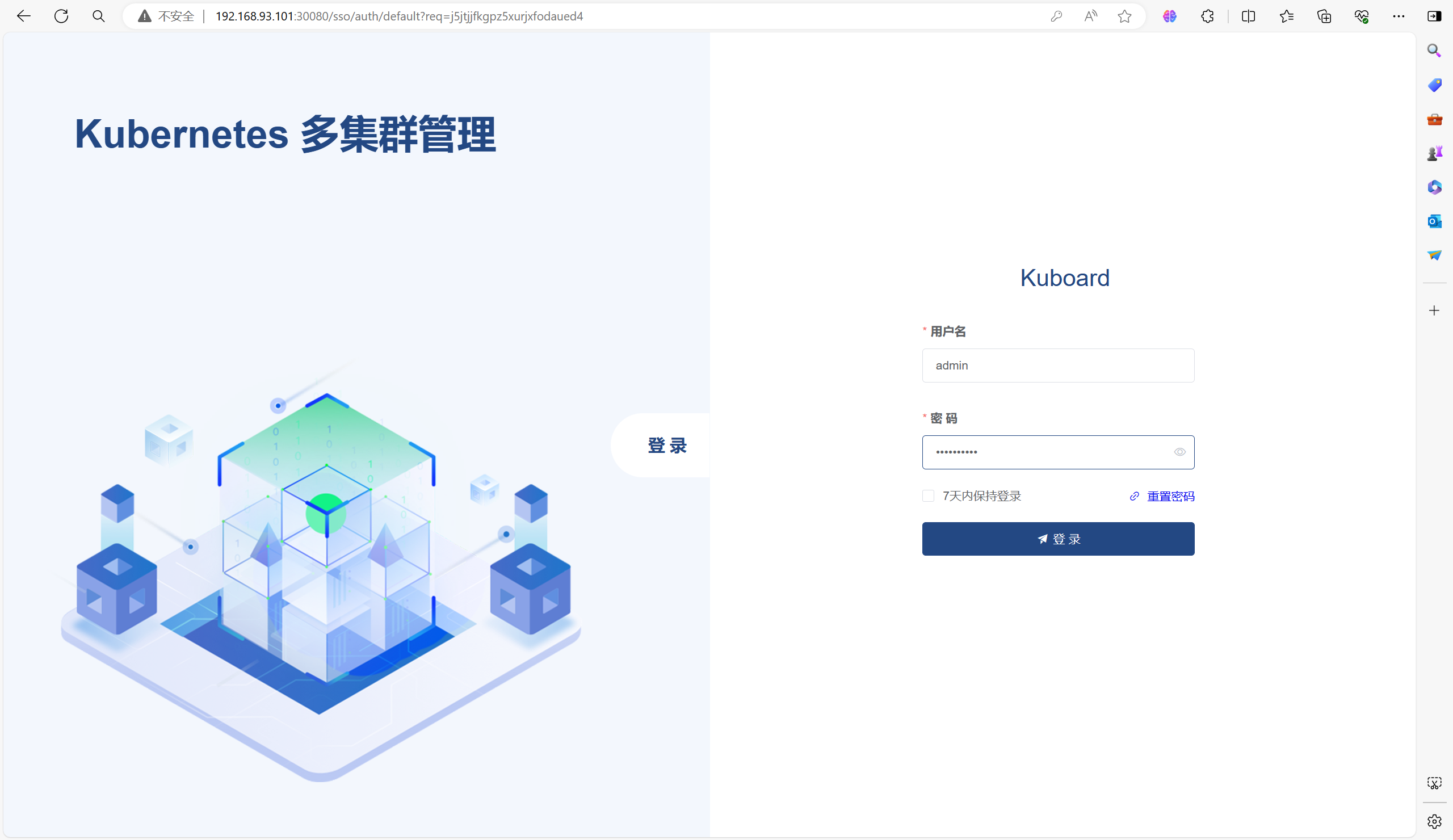
访问地址:http://192.168.93.101:30080(集群任意IP都可以当时必须要带上端口)
默认用户名:admin
默认密 码:Kuboard123
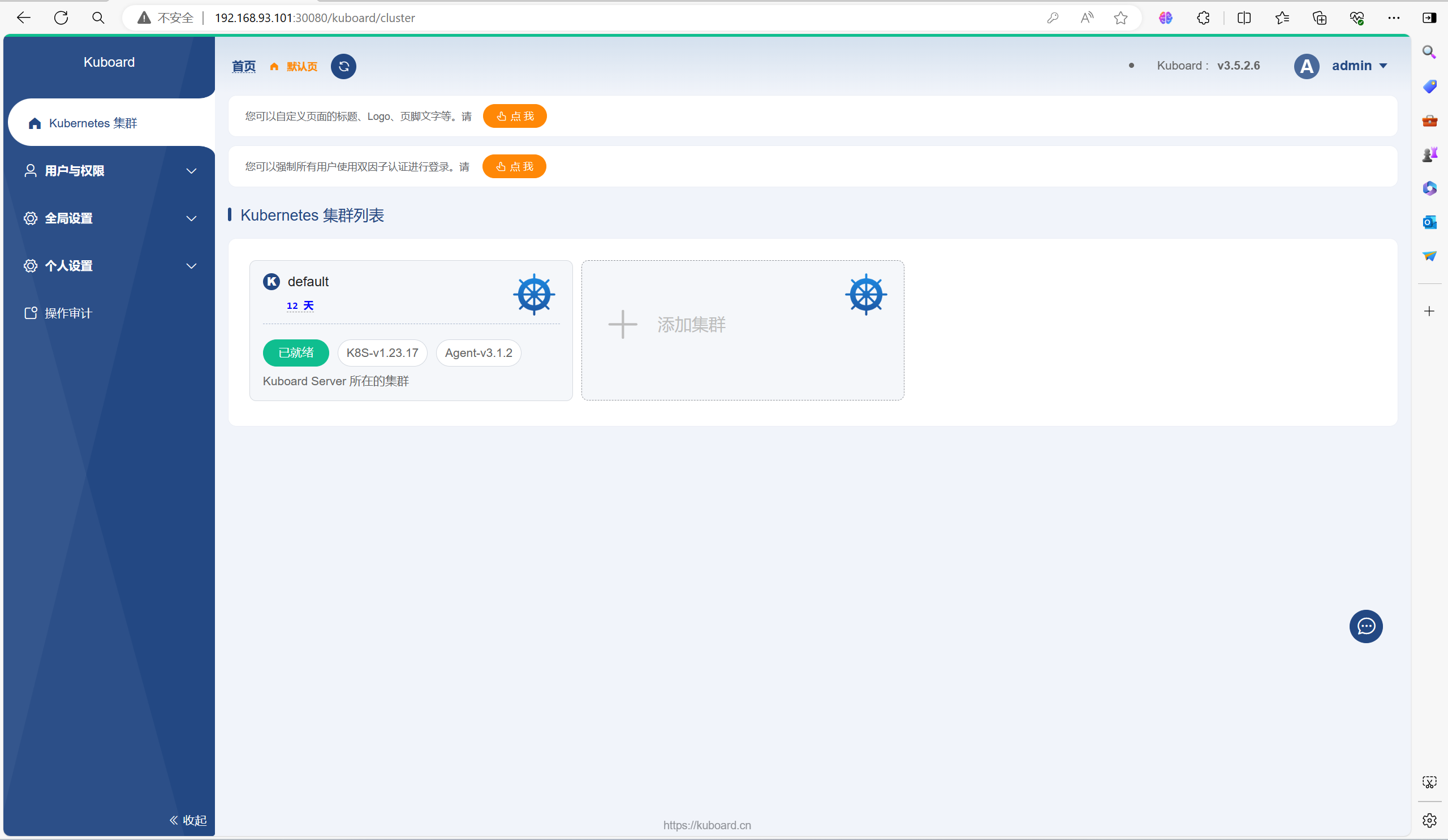
3.3、操作集群
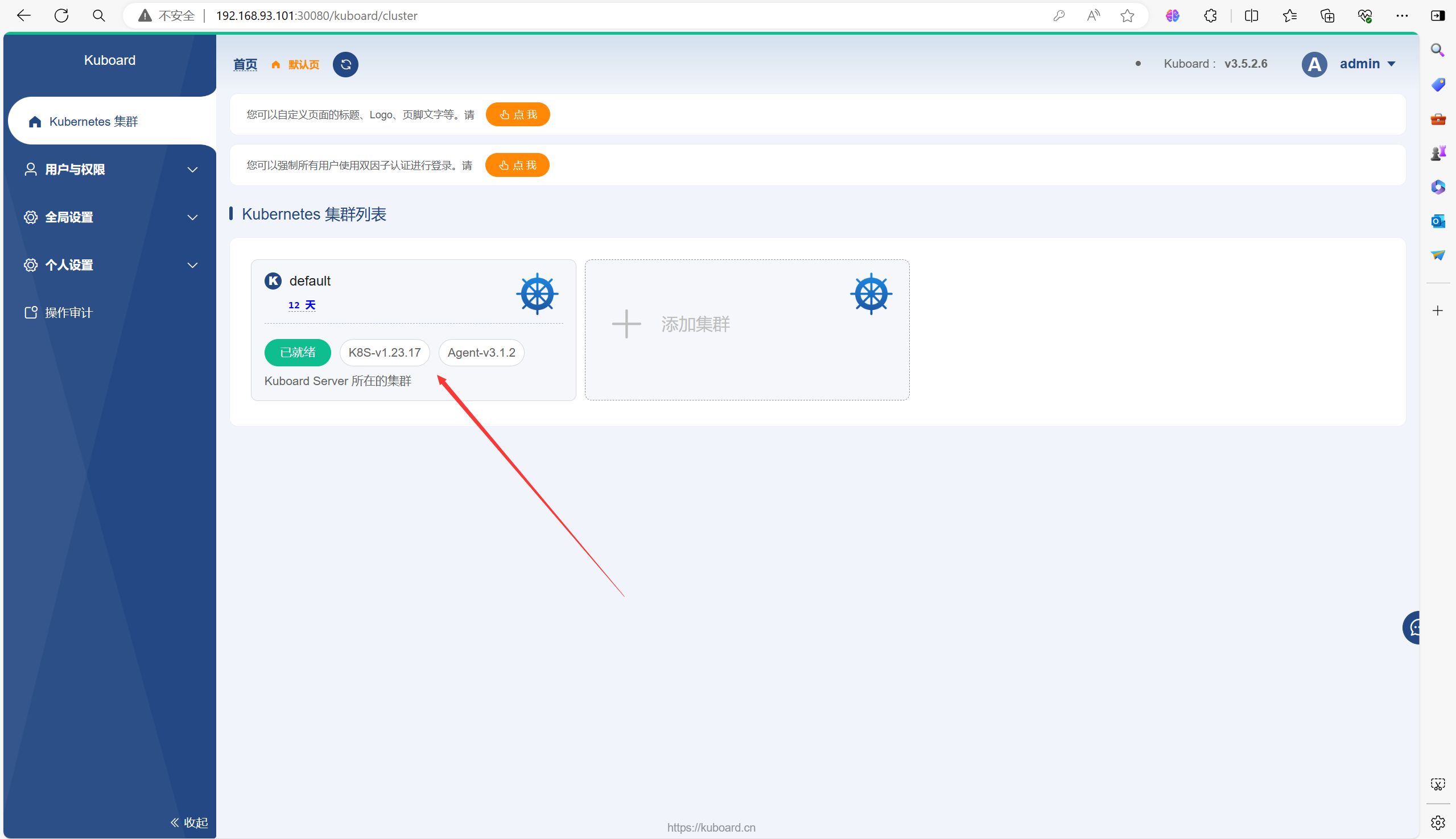
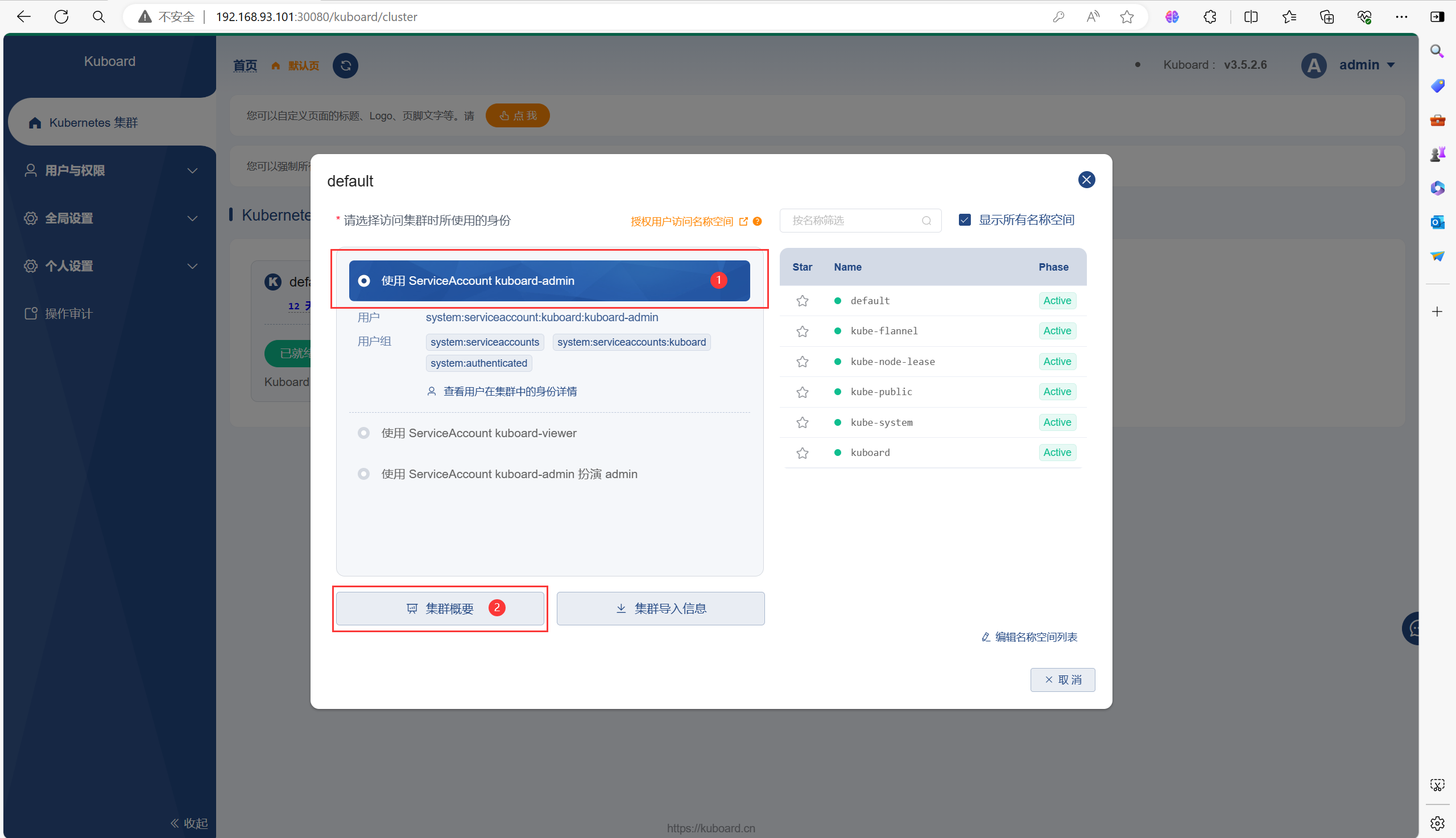
如果你是第一次登录的话,下面的页面中你可能不是已准备,根据提示在master节点上进行操作即可(很简单)
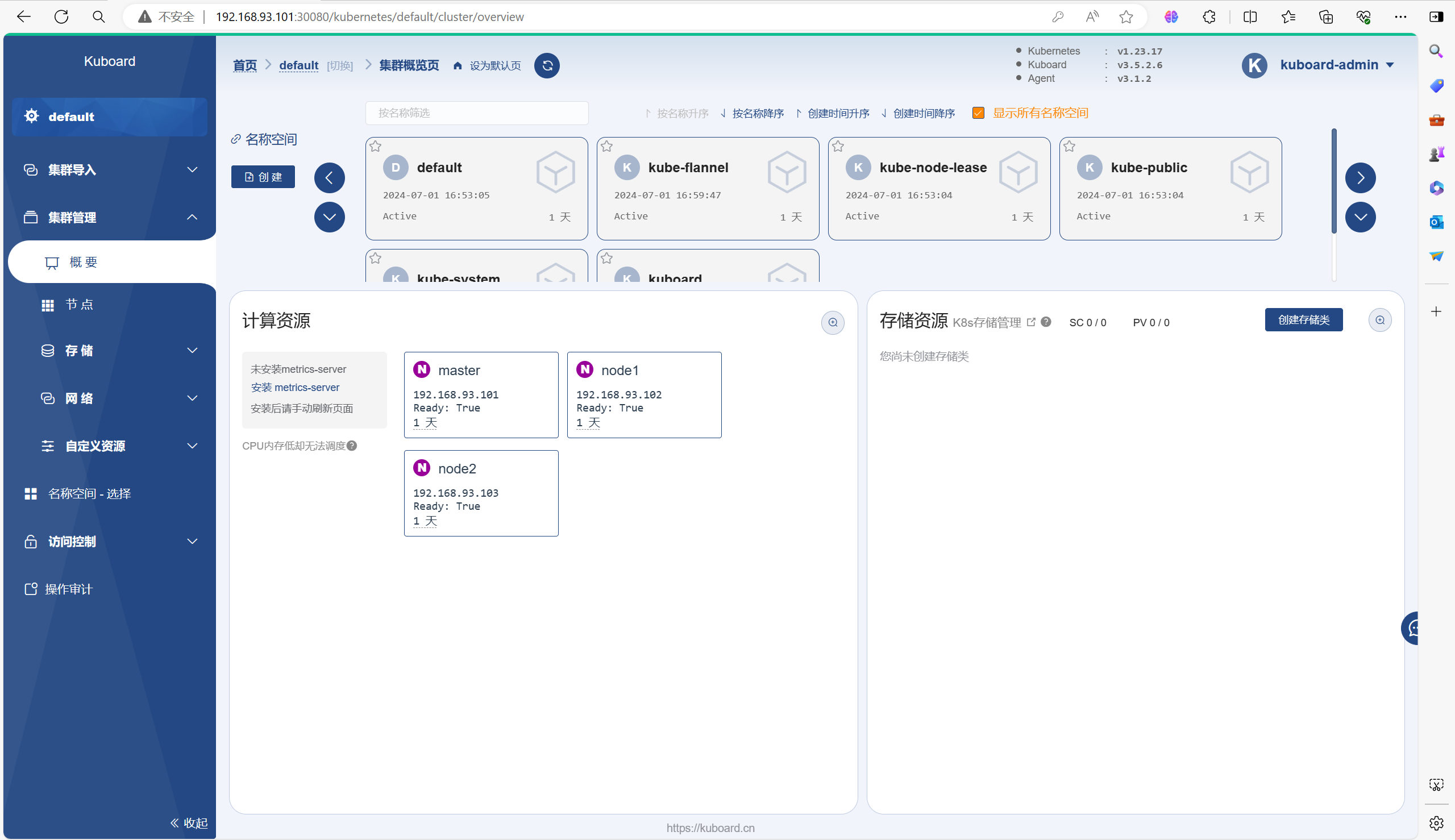
3.4、自由探索
可以在里面创建Pod或Deployment等等之类的资源
以下是一个创建Deployment的流程
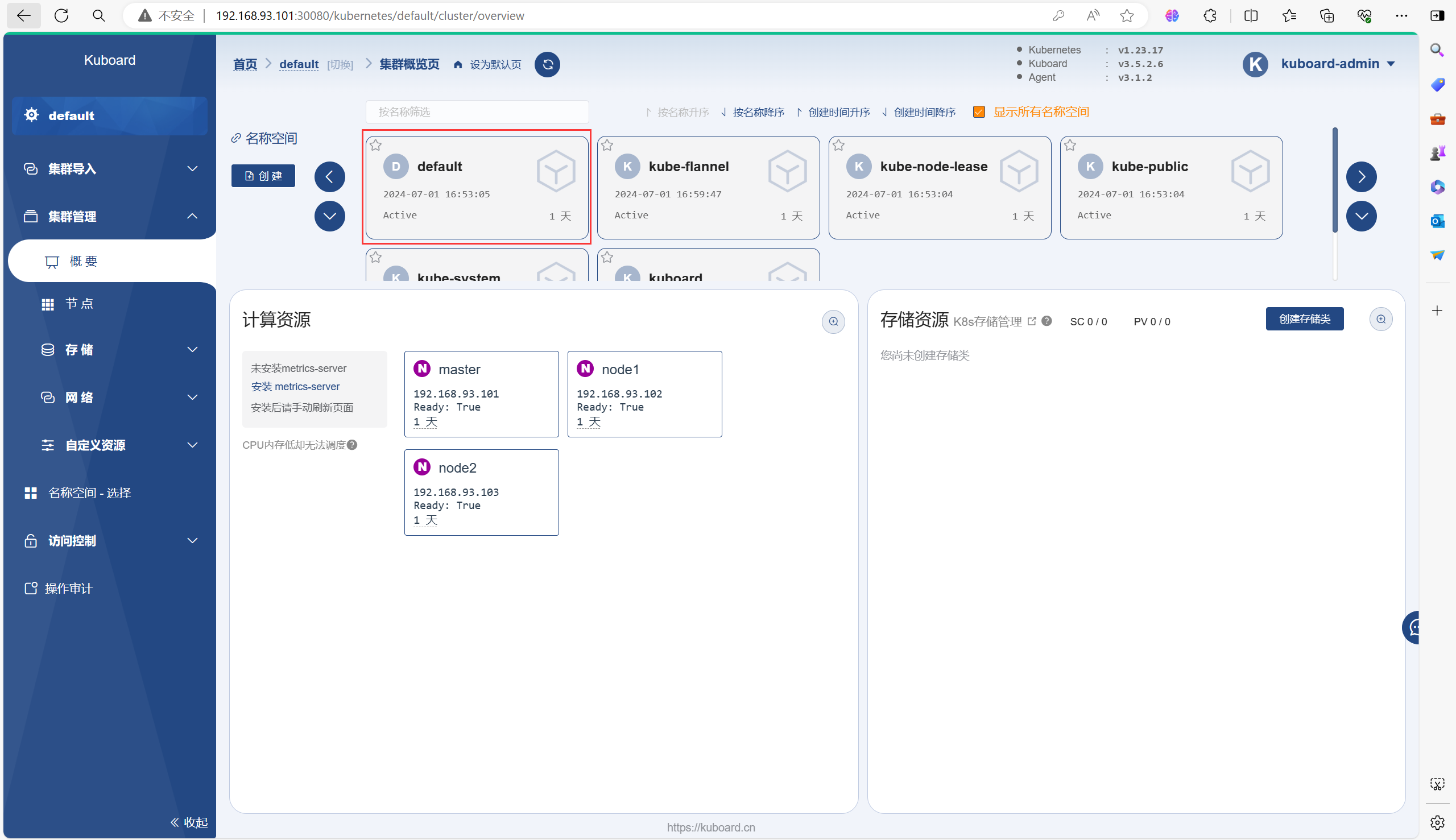
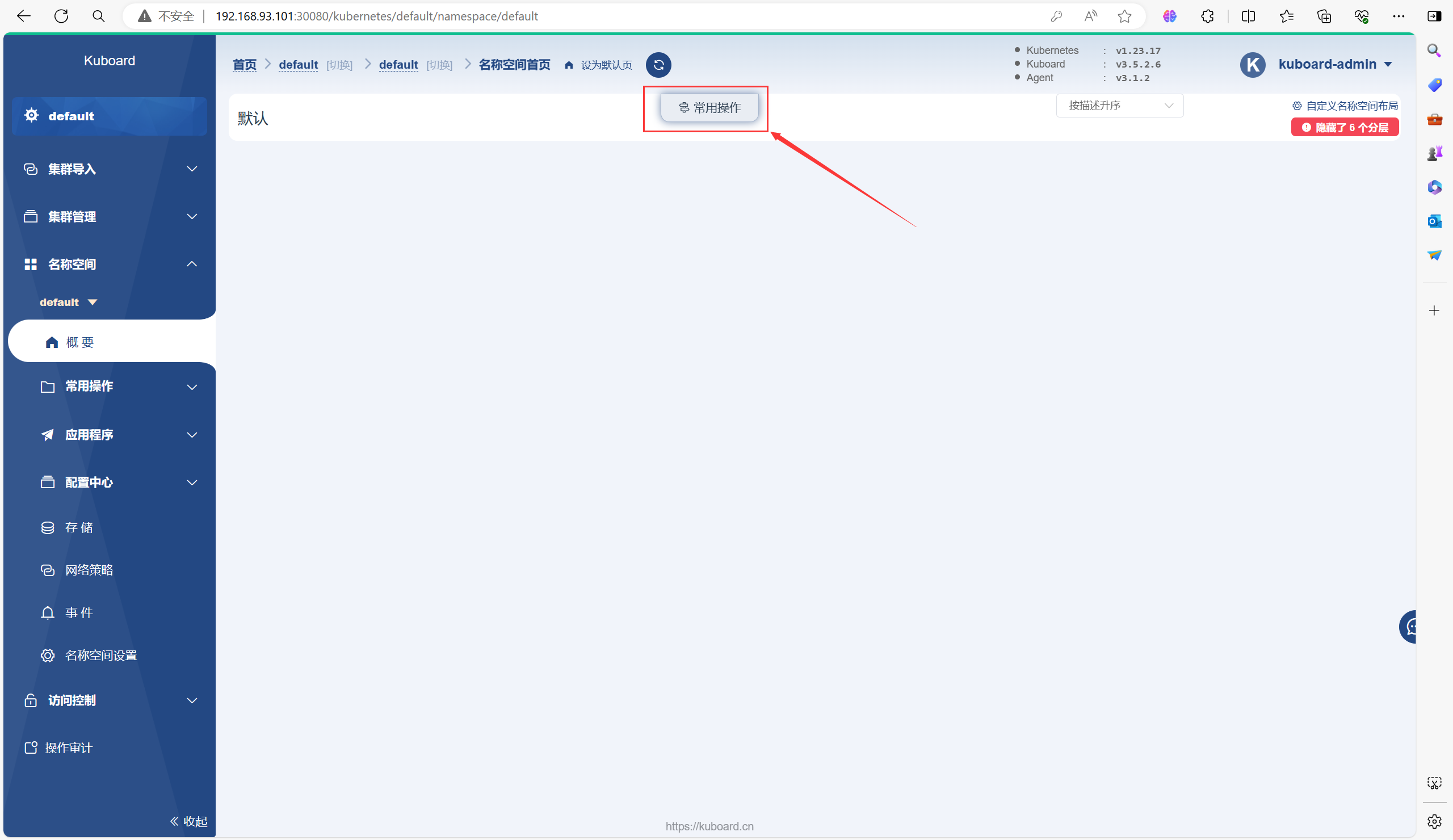
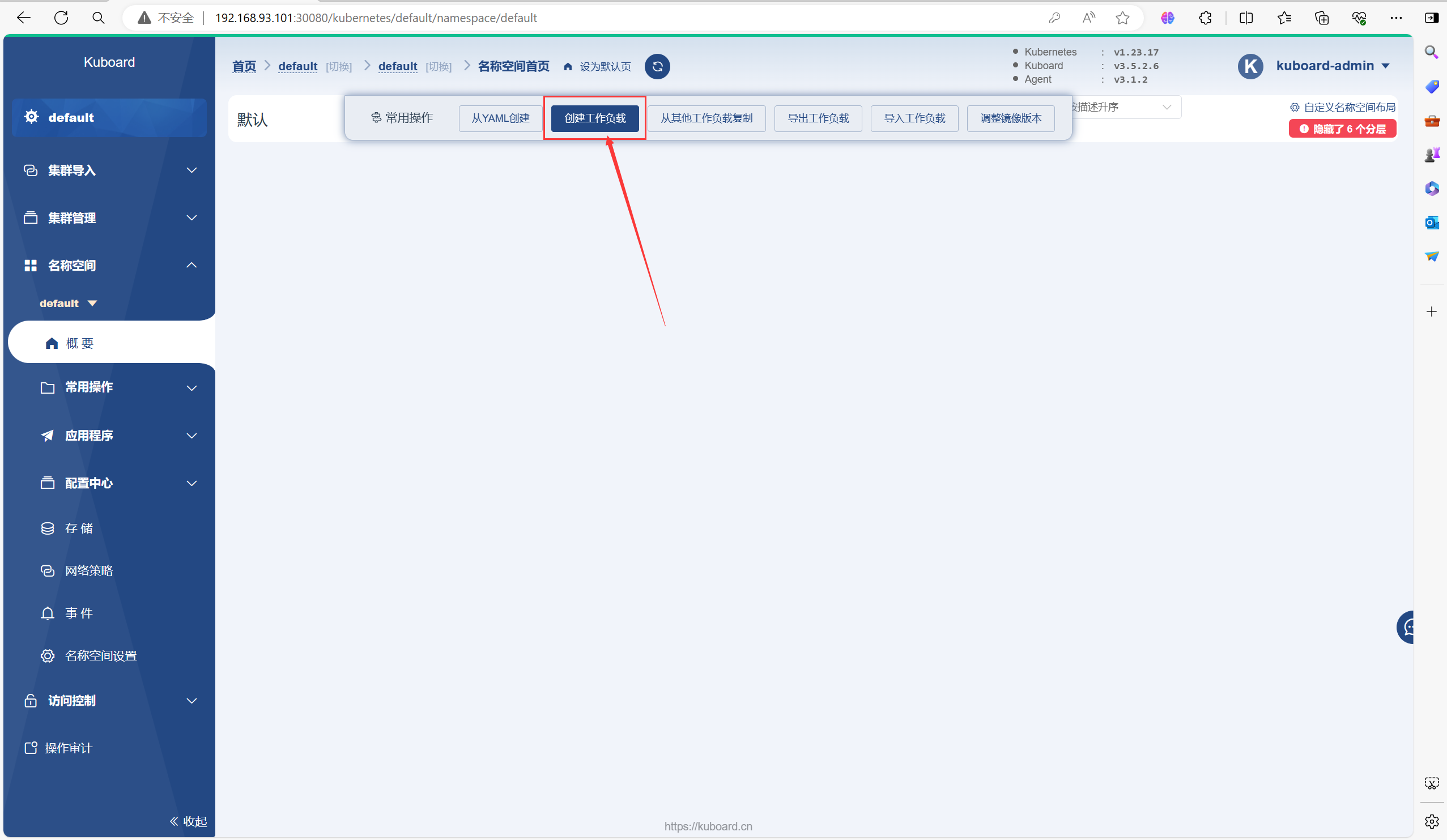
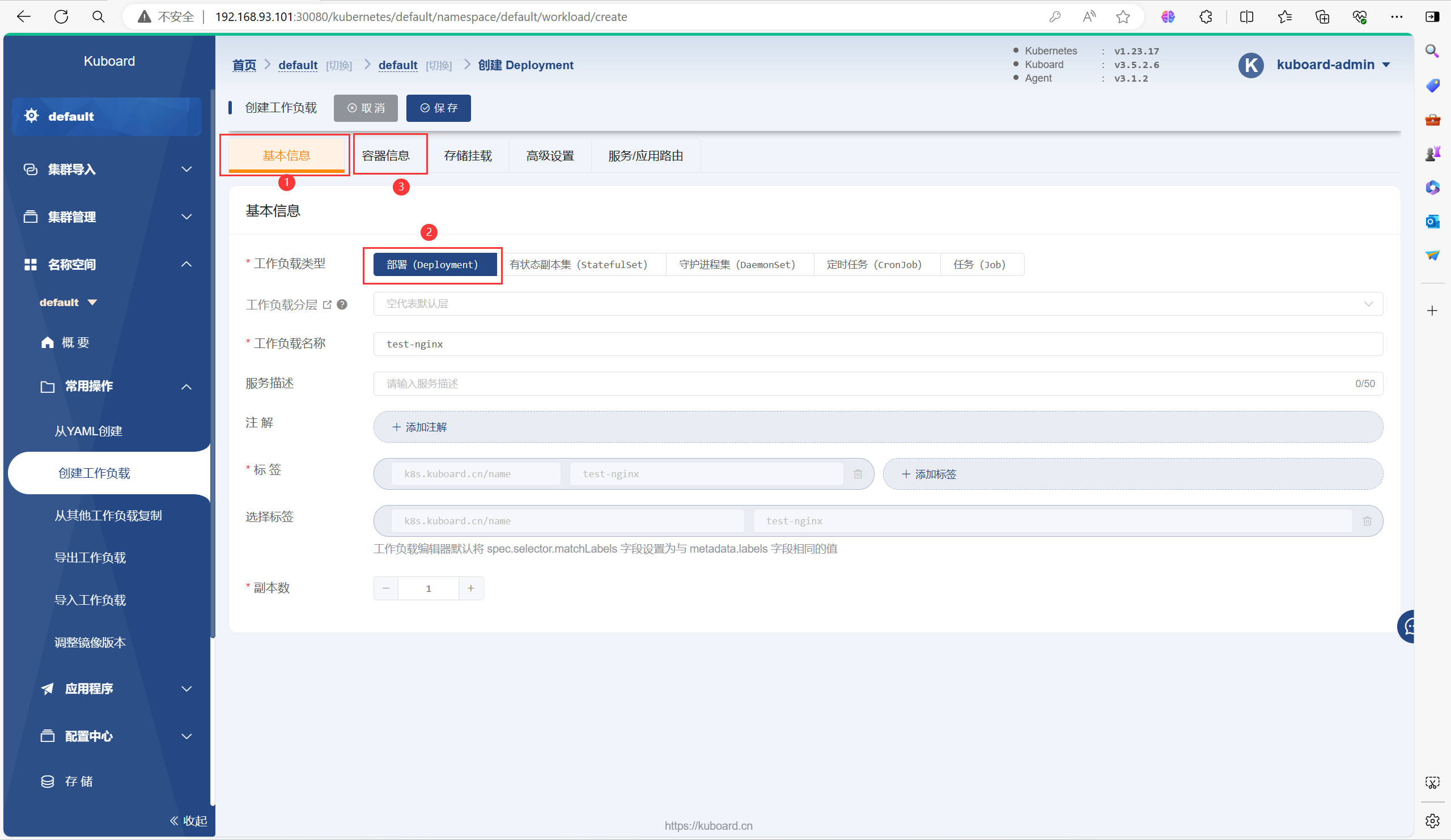
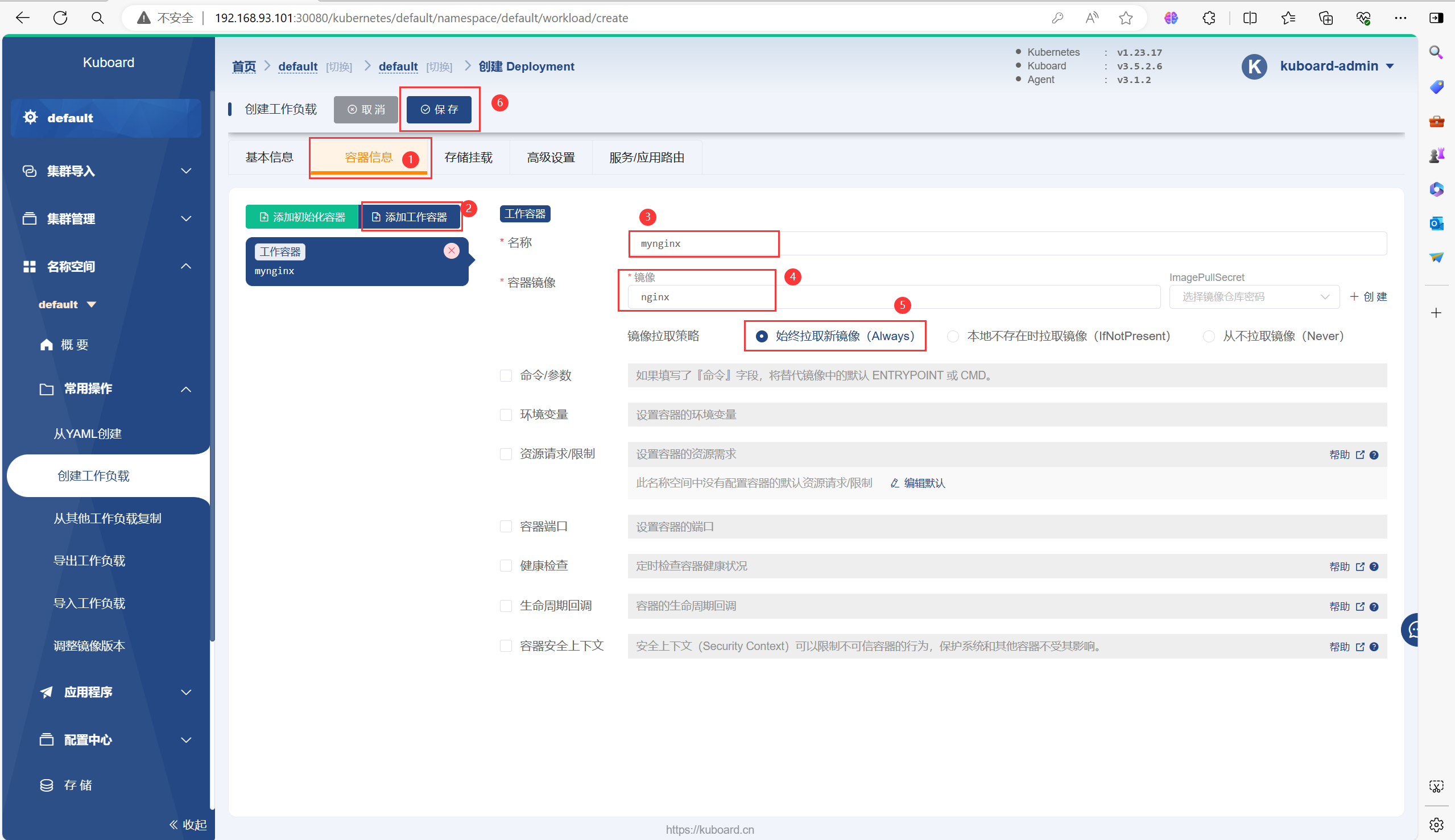
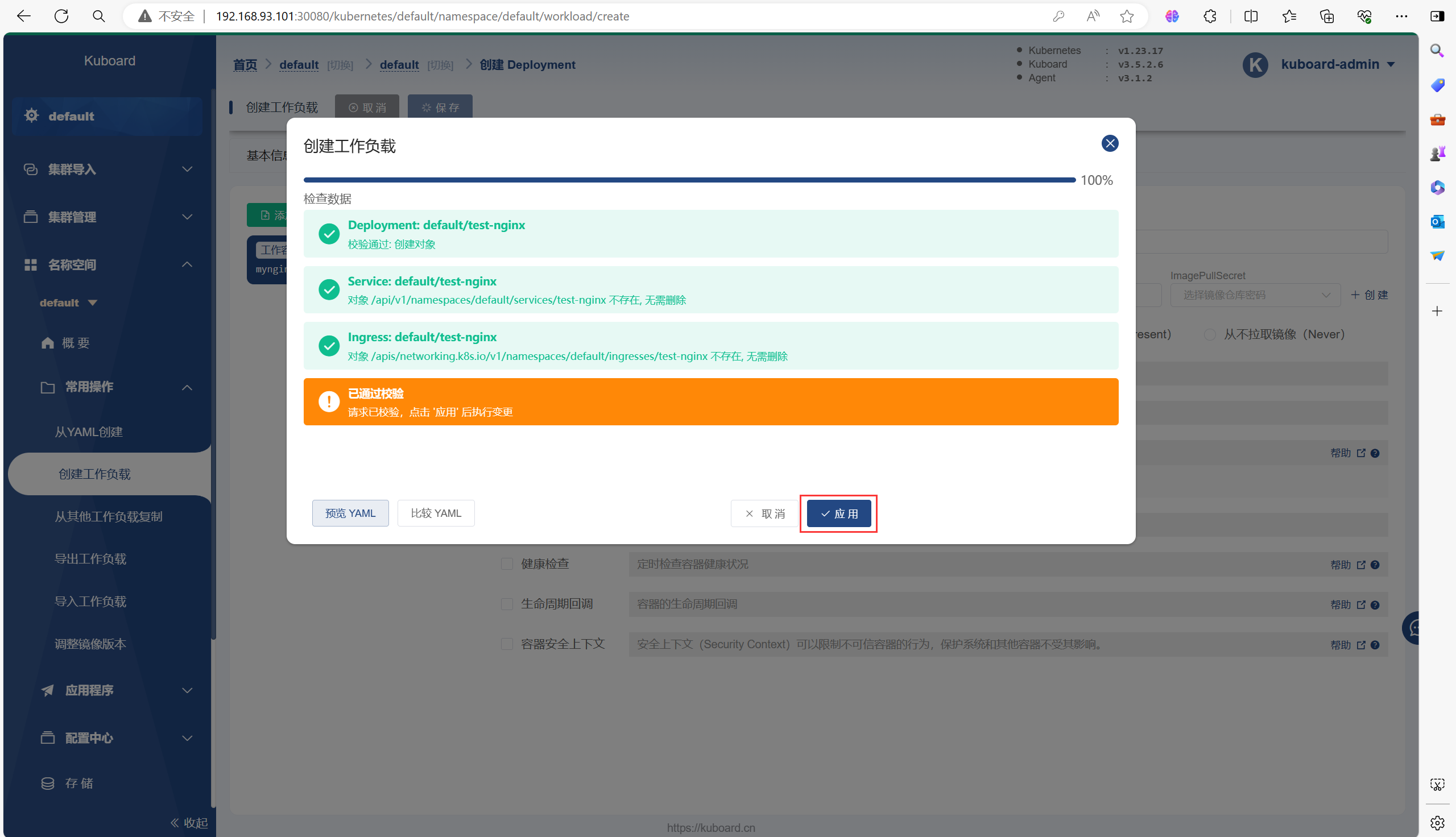
需要等待一会再能运行起来Pod,因为需要拉取镜像等一些操作
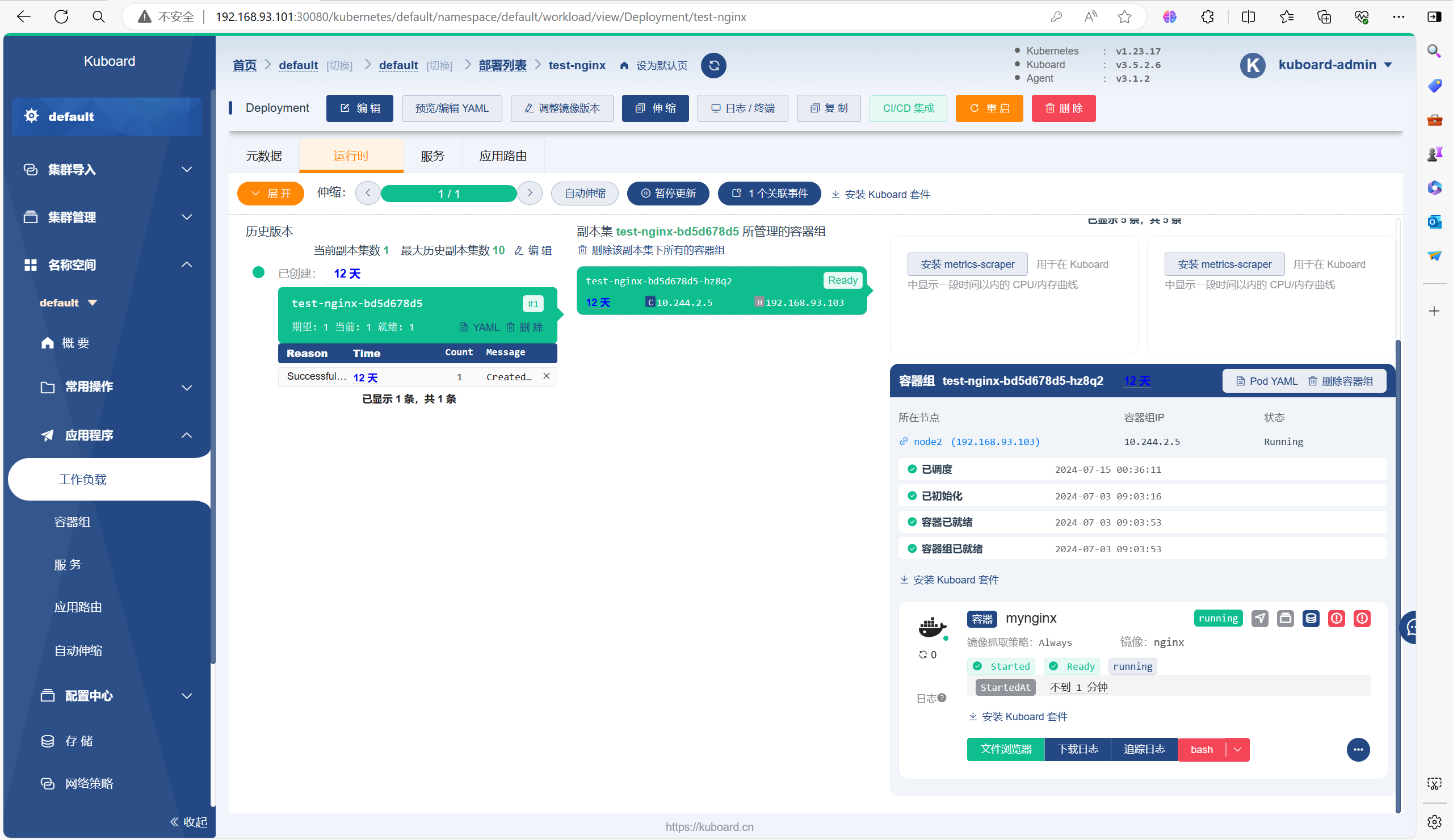
# 部署好以后,也可以去Kubernetes集群里面使用命令查看刚才部署的
[root@master ~]# kubectl get deployment
NAME         READY   UP-TO-DATE   AVAILABLE   AGE
test-nginx   1/1     1            1           2m36s
[root@master ~]# kubectl get pod
NAME                         READY   STATUS    RESTARTS   AGE
test-nginx-bd5d678d5-hz8q2   1/1     Running   0          2m39s
四、RBAC授权
4.1、K8S安装管理:认证、授权、准入控制概述
k8s对我们整个系统的认证、授权、访问控制做偶尔精密的设置;对于k8s集群来说apiserver是整个集群访问控制的唯一入口,我们在k8s集群之上部署应用程序的时候,也可以通过宿主机的NodePort暴露的端口访问里面的程序,用户访问kubernetes集群需要经历如下认证过程:认证->授权->准入控制(adminationcontroller)
基于角色(Role)的访问控制(RBAC)是一种基于组织中用户的角色来调节控制对计算机或网络源的访问方法。
RBAC签权机制使用rbac.authorization.k8s.io API组来驱动签权决定,允许你通过Kubernetes API动态配置策略。
RBAC API声明了四种Kubernetes对象:Role、ClusterRole、RoleBinding和ClusterRoleBinding。你可以像其他Kubernetes对象一样,通过类似kubectl这类工具描述或修补RBAC对象。
4.2、Role和ClusterRole
RBAC的Role或ClusterRole中包含一组代表相关权限的规则。这些规则是纯粹累加的(不存在拒绝某操作的规则)
Role总是用来在某个名称空间内设置权限;在你创建Role时,你必须指定该Role所属的名称空间
与之相比,ClusterRole则是一个集群作用域的资源。这两种资源的名字不同(Role和ClusterRole)是因为Kubernetes对象要么是名称空间作用域的,要么是集群作用域的,不可亮则兼具。
ClusterRole 有若干用法。你可以用它来:
定义对某名称空间域对象的访问权限,并将在个别名称空间被授权访问权限;
为名称空间作用域的对象设置访问权限,并被授予跨所有名称空间的访问权限;
为集群作用域的资源定于访问权限
如果你希望在名称空间内定义角色,应该使用Role;如果你希望定义集群范围的角色,应该使用ClusterRole。
4.3、RoleBinding 和 ClusterRoleBindin
角色绑定(Role Binding)是将角色中定义的权限赋予一个或者一组用户。它包含若干主体(Subject)(用户、组或服务账号)的列表和对这些主体所获得的角色的引用。RoleBinding在指定的名称空间执行授权,而ClusterRoleBinding在集群范围执行授权
一个RoleBinding可以引用同一名称空间的任何Role。或者,一个RoleBinding可以引用某ClusterRole并将该ClusterRole绑定到RoleBinding所在的名称空间。如果你希望将某ClusterRole绑定到集群中所有名称空间,你要先使用ClusterRoleBinding
RoleBinding或ClusterRoleBinding对象的名称必须是合法的,路径分段名称
4.4、示例
以下是创建一个用户配置RBAC权限只能操作Kubernetes集群的指定名称空间
# 生成一个私钥
[root@master ~]# cd /etc/kubernetes/pki/
[root@master pki]# (umask 077; openssl genrsa -out lucky.key 2048)
Generating RSA private key, 2048 bit long modulus
..................................................................+++
......................+++
e is 65537 (0x10001)


# 生成一个证书请求
[root@master pki]# openssl req -new -key lucky.key -out lucky.csr -subj "/CN=lucky"


# 生成一个证书
[root@master pki]# openssl x509 -req -in lucky.csr -CA ca.crt -CAkey ca.key -CAcreateserial -out lucky.crt -days 3650
Signature ok
subject=/CN=lucky
Getting CA Private Key


# 在 kubernetes 下新增加一个 lucky 这个用户
# 把 lucky 这个用户添加到kubernetes集群中,可以用来认证apiserver的连接
[root@master pki]# kubectl config set-credentials lucky --client-certificate=./lucky.crt --client-key=./lucky.key --embed-certs=true
User "lucky" set.

# 在kubeconfig下新增加一个lucky这个账号
[root@master pki]# kubectl config set-context lucky@kubernetes --cluster=kubernetes --user=lucky
Context "lucky@kubernetes" created.


# 把这个用户通过relebinding绑定到clusterrole上,授予权限,权限只是在lucky这个名称空间有效
# 把lucky这个用户通过relebinding绑定到clusterrole上
[root@master pki]# kubectl create ns lucky
namespace/lucky created
[root@master pki]# kubectl create rolebinding lucky -n lucky --clusterrole=cluster-admin --user=lucky
rolebinding.rbac.authorization.k8s.io/lucky created


# 切换到lucky这个用户
[root@master pki]# kubectl config use-context lucky@kubernetes
Switched to context "lucky@kubernetes".


# 有权限操作这个名称空间
[root@master pki]# kubectl get pod -n lucky
No resources found in lucky namespace.


# 没权限操作其他名称空间
[root@master pki]# kubectl get pod
Error from server (Forbidden): pods is forbidden: User "lucky" cannot list resource "pods" in API group "" in the namespace "default"


# 退出到原本账号
[root@master pki]# kubectl config use-context kubernetes-admin@kubernetes
Switched to context "kubernetes-admin@kubernetes".
5、Helm
5.1、什么是Helm
Helm是Kubernetes的包管理工具,相当于linux环境下的yum命令。
Helm的首要目标一直是让“从零到Kubernetes”变得轻松。无论是运维、开发人员、经验丰富的DevOps工程师,还是刚刚入门的学生,Helm的目标是让大家在两分钟内就可以在Kubernetes上安装应用程序
Helm可以解决的问题:运维人员写资源文件模板,交给开发人员填写参数即可
5.2、Helm中的一些概念
helm:命令行客户端工具,主要用于Kubernetes应用中的chart的创建、打包、发布和管理
Chart:helm程序包,一系列用于描述k8s资源相关文件的集合,比方说我们部署nginx需要deployment的yaml,需要service的yaml,这两个清单就是一个helm程序包,在k8s中把这些yaml清单文件叫做chart图表
vlues.yaml文件为模板中的文件赋值,可以实现我们自定义安装
如果chart开发者需要自定义模板,如果是chart使用者只需要修改values.yaml接
repository:存放chart图表的仓库,提供部署k8s应用程序需要的那些yaml清单文件
chart--->通过values.yaml这个文件赋值--->生成release实例
Release:基于Chart的部署实体,一个chart被Helm运行后将会生成对应的一个release;将在k8s中创建出真实运行的资源对象
5.3、总结
helm把kubernetes资源打包到一个chart中,制作并完成各个chart和chart本身依赖关系并利用chart仓库实现对外分发,而helm还可通过values.yaml文件完成可配置的发布,如果chart版本更新了,helm自动支持滚动更新机制,还可以一键回滚,但是不适合在生成环境使用,除非具有定义自制chart的能力
5.4、安装Helm
Helm 版本	支持的 Kubernetes 版本
3.12.x	1.27.x - 1.24.x
3.11.x	1.26.x - 1.23.x
3.10.x	1.25.x - 1.22.x
3.9.x	1.24.x - 1.21.x
3.8.x	1.23.x - 1.20.x
3.7.x	1.22.x - 1.19.x
3.6.x	1.21.x - 1.18.x
3.5.x	1.20.x - 1.17.x
3.4.x	1.19.x - 1.16.x
3.3.x	1.18.x - 1.15.x
3.2.x	1.18.x - 1.15.x
3.1.x	1.17.x - 1.14.x
3.0.x	1.16.x - 1.13.x
2.16.x	1.16.x - 1.15.x
2.15.x	1.15.x - 1.14.x
2.14.x	1.14.x - 1.13.x
2.13.x	1.13.x - 1.12.x
2.12.x	1.12.x - 1.11.x
2.11.x	1.11.x - 1.10.x
2.10.x	1.10.x - 1.9.x
2.9.x	1.10.x - 1.9.x
2.8.x	1.9.x - 1.8.x
2.7.x	1.8.x - 1.7.x
2.6.x	1.7.x - 1.6.x
2.5.x	1.6.x - 1.5.x
2.4.x	1.6.x - 1.5.x
2.3.x	1.5.x - 1.4.x
2.2.x	1.5.x - 1.4.x
2.1.x	1.5.x - 1.4.x
2.0.x	1.4.x - 1.3.x
[root@master ~]# tar -zxvf helm-v3.8.1-linux-amd64.tar.gz
[root@master ~]# mv linux-amd64/helm /usr/bin/
[root@master ~]# helm version
WARNING: Kubernetes configuration file is group-readable. This is insecure. Location: /root/.kube/config
WARNING: Kubernetes configuration file is world-readable. This is insecure. Location: /root/.kube/config
version.BuildInfo{Version:"v3.8.1", GitCommit:"5cb9af4b1b271d11d7a97a71df3ac337dd94ad37", GitTreeState:"clean", GoVersion:"go1.17.5"}5.5、配置仓库
5.5.1、添加仓库
# 添加阿里云的chart仓库
[root@master ~]# helm repo add aliyun https://kubernetes.oss-cn-hangzhou.aliyuncs.com/charts
WARNING: Kubernetes configuration file is group-readable. This is insecure. Location: /root/.kube/config
WARNING: Kubernetes configuration file is world-readable. This is insecure. Location: /root/.kube/config
"aliyun" has been added to your repositories


# 添加bitnami的仓库
[root@master ~]# helm repo add bitnami https://charts.bitnami.com/bitnami
WARNING: Kubernetes configuration file is group-readable. This is insecure. Location: /root/.kube/config
WARNING: Kubernetes configuration file is world-readable. This is insecure. Location: /root/.kube/config
"bitnami" has been added to your repositories
5.5.2、更新仓库
能不能更新取决于网速
[root@master ~]# helm repo update
WARNING: Kubernetes configuration file is group-readable. This is insecure. Location: /root/.kube/config
WARNING: Kubernetes configuration file is world-readable. This is insecure. Location: /root/.kube/config
Hang tight while we grab the latest from your chart repositories...
...Successfully got an update from the "aliyun" chart repository
...Successfully got an update from the "bitnami" chart repository
Update Complete. ⎈Happy Helming!⎈
5.5.3、仓库仓库
[root@master ~]# helm repo list
WARNING: Kubernetes configuration file is group-readable. This is insecure. Location: /root/.kube/config
WARNING: Kubernetes configuration file is world-readable. This is insecure. Location: /root/.kube/config
NAME   	URL
aliyun 	https://kubernetes.oss-cn-hangzhou.aliyuncs.com/charts
bitnami	https://charts.bitnami.com/bitnami
5.5.4、删除仓库
[root@master ~]# helm repo remove aliyun
WARNING: Kubernetes configuration file is group-readable. This is insecure. Location: /root/.kube/config
WARNING: Kubernetes configuration file is world-readable. This is insecure. Location: /root/.kube/config
"aliyun" has been removed from your repositories
5.6、基本使用
5.6.1、搜索Chart
# 查看阿里云 chart 仓库中的memcached
[root@master ~]# helm search repo aliyun | grep memcached
WARNING: Kubernetes configuration file is group-readable. This is insecure. Location: /root/.kube/config
WARNING: Kubernetes configuration file is world-readable. This is insecure. Location: /root/.kube/config
aliyun/mcrouter               	0.1.0        	0.36.0       	Mcrouter is a memcached protocol router for sca...
aliyun/memcached              	2.0.1        	             	Free & open source, high-performance, distribut...
5.6.2、查看Chart
[root@master ~]# helm show chart aliyun/memcached
WARNING: Kubernetes configuration file is group-readable. This is insecure. Location: /root/.kube/config
WARNING: Kubernetes configuration file is world-readable. This is insecure. Location: /root/.kube/config
apiVersion: v1
description: Free & open source, high-performance, distributed memory object caching
  system.
home: http://memcached.org/
icon: https://upload.wikimedia.org/wikipedia/en/thumb/2/27/Memcached.svg/1024px-Memcached.svg.png
keywords:
- memcached
- cache
maintainers:
- email: gtaylor@gc-taylor.com
  name: Greg Taylor
name: memcached
sources:
- https://github.com/docker-library/memcached
version: 2.0.1
5.6.3、下载Chart
[root@master ~]# helm pull aliyun/memcached
WARNING: Kubernetes configuration file is group-readable. This is insecure. Location: /root/.kube/config
WARNING: Kubernetes configuration file is world-readable. This is insecure. Location: /root/.kube/config


# 执行命令成功以后会在当前目录下,下载.tar.gz的memcahced压缩包,如果解压之后回显不可信的旧时间戳不影响
[root@master ~]# tar -zxvf memcached-2.0.1.tgz
[root@master memcached]# ls
Chart.yaml  README.md  templates  values.yaml
# Chart.yaml:chart的基本信息,包括版本名字之类
# templates:存放k8s的部署资源模板,通过渲染变量得到部署文件
# values.yaml:存放全局变量,templates下的文件可以调用


[root@master memcached]# cd templates/
[root@master templates]# ls
_helpers.tpl  NOTES.txt  pdb.yaml  statefulset.yaml  svc.yaml
# _helpers.tpl:存放能够复用的模板
# NOTES.txt:为用户提供一个关于chart的部署后使用说明文件
5.6.4、部署Chart
# 需要将templates目录下的statefulset.yaml文件的apiVersion后面的values值变成apps/v1
[root@master templates]# vim statefulset.yaml
apiVersion: apps/v1


# 需要在templates目录下的statefulset.yaml文件的spec字段下添加
[root@master templates]# vim statefulset.yaml
selector:
    matchLabels:
      app: {{ template "memcached.fullname" . }}
      chart: "{{ .Chart.Name }}-{{ .Chart.Version }}"
      release: "{{ .Release.Name }}"
      heritage: "{{ .Release.Service }}"
# 删除affinity亲和性配置,以下为删除内容
[root@master templates]# vim statefulset.yaml
affinity:
        podAntiAffinity:
        {{- if eq .Values.AntiAffinity "hard" }}
          requiredDuringSchedulingIgnoredDuringExecution:
          - topologyKey: "kubernetes.io/hostname"
            labelSelector:
              matchLabels:
                app:  {{ template "memcached.fullname" . }}
                release: {{ .Release.Name | quote }}
        {{- else if eq .Values.AntiAffinity "soft" }}
          preferredDuringSchedulingIgnoredDuringExecution:
          - weight: 5
            podAffinityTerm:
              topologyKey: "kubernetes.io/hostname"
              labelSelector:
                matchLabels:
                  app:  {{ template "memcached.fullname" . }}
                  release: {{ .Release.Name | quote }}
        {{- end }}


[root@master templates]# cd ..
[root@master memcached]# helm install memcached ./
WARNING: Kubernetes configuration file is group-readable. This is insecure. Location: /root/.kube/config
WARNING: Kubernetes configuration file is world-readable. This is insecure. Location: /root/.kube/config
W0715 02:17:24.503924   86751 warnings.go:70] policy/v1beta1 PodDisruptionBudget is deprecated in v1.21+, unavailable in v1.25+; use policy/v1 PodDisruptionBudget
W0715 02:17:24.527909   86751 warnings.go:70] policy/v1beta1 PodDisruptionBudget is deprecated in v1.21+, unavailable in v1.25+; use policy/v1 PodDisruptionBudget
NAME: memcached
LAST DEPLOYED: Mon Jul 15 02:17:24 2024
NAMESPACE: default
STATUS: deployed
REVISION: 1
TEST SUITE: None
NOTES:
Memcached can be accessed via port 11211 on the following DNS name from within your cluster:
memcached-memcached.default.svc.cluster.local

If you'd like to test your instance, forward the port locally:

  export POD_NAME=$(kubectl get pods --namespace default -l "app=memcached-memcached" -o jsonpath="{.items[0].metadata.name}")
  kubectl port-forward $POD_NAME 11211

In another tab, attempt to set a key:

  $ echo -e 'set mykey 0 60 5\r\nhello\r' | nc localhost 11211

You should see:

  STORED
5.7、Release操作
5.7.1、查看release
[root@master ~]# helm list
WARNING: Kubernetes configuration file is group-readable. This is insecure. Location: /root/.kube/config
WARNING: Kubernetes configuration file is world-readable. This is insecure. Location: /root/.kube/config
NAME     	NAMESPACE	REVISION	UPDATED                                	STATUS  	CHART          	APP VERSION
memcached	default  	1       	2024-07-15 02:17:24.304393545 +0800 CST	deployed	memcached-2.0.1
5.7.2、删除release
[root@master ~]# helm delete memcached
WARNING: Kubernetes configuration file is group-readable. This is insecure. Location: /root/.kube/config
WARNING: Kubernetes configuration file is world-readable. This is insecure. Location: /root/.kube/config
W0715 02:18:44.989018   87365 warnings.go:70] policy/v1beta1 PodDisruptionBudget is deprecated in v1.21+, unavailable in v1.25+; use policy/v1 PodDisruptionBudget
release "memcached" uninstalled
5.8、自定义Chart
5.8.1、创建模板
当我们安装好helm之后我们可以自定义chart,那么我们需要先创建出一个模板如下
[root@master ~]# helm create myapp
WARNING: Kubernetes configuration file is group-readable. This is insecure. Location: /root/.kube/config
WARNING: Kubernetes configuration file is world-readable. This is insecure. Location: /root/.kube/config
Creating myapp


# 查看目录结构
[root@master ~]# tree myapp/
myapp/
├── charts
├── Chart.yaml
├── templates
│   ├── deployment.yaml
│   ├── _helpers.tpl
│   ├── hpa.yaml
│   ├── ingress.yaml
│   ├── NOTES.txt
│   ├── serviceaccount.yaml
│   ├── service.yaml
│   └── tests
│       └── test-connection.yaml
└── values.yaml

3 directories, 10 files
5.8.2、编写Chart
5.8.2.1、编写Chart.yaml
解释说明:Chart.yaml文件主要用来描述对应chart的相关属性信息,其中apiVersion字段用于描述对chart使用的api版本,默认是v2版本;name字段用来描述对应chart的名称;description字段用于描述对应chart的说迷你给简介;type字段用户描述对应chart是应用程序还是库文件,应用程序类型的chart,它可以郧西你个为一个release,但库类型的chart不能运行为release,它只能作为依赖被application类型的chart所使用;version字段用于描述对用chart版本;appVersion字段用于描述对应chart内部程序的版本信息;
[root@master ~]# cd myapp/
# 更改为以下内容
[root@master myapp]# vim Chart.yaml
apiVersion: v2
name: myapp
description: A Helm chart for Kubernetes
version: 0.0.1
appVersion: "latest"
type: application
maintainer:
- name: lichaung
  wechat: 11111111111
5.8.2.2、编写deployment.yaml
解释·:该部署清单模板文件,主要用go模板语言来写的,其中{{ include "myapp.fullname" . }}就表示取myapp的全名;{{ .Values.image.repository }}这段代码表示读取当前目录下的values文件中的image.repository字段的值;{{ .Values.image.tag | default .Chart.AppVersion }}表示对于values文件中image.tag的值或者读取default.chart文件中的AppVersion字段的值;简单讲go模板就是应用对应go模板语法来定义关属性的的值;一般都是从values.yaml文件中加载对应字段的值作为模板文件相关属性的值
nindent 4:表示首行缩进4个字母
[root@master myapp]# cat templates/deployment.yaml
apiVersion: apps/v1
kind: Deployment
metadata:
  name: {{ include "myapp.fullname" . }}
  labels:
    {{- include "myapp.labels" . | nindent 4 }}
spec:
  {{- if not .Values.autoscaling.enabled }}
  replicas: {{ .Values.replicaCount }}
  {{- end }}
  selector:
    matchLabels:
      {{- include "myapp.selectorLabels" . | nindent 6 }}
  template:
    metadata:
      {{- with .Values.podAnnotations }}
      annotations:
        {{- toYaml . | nindent 8 }}
      {{- end }}
      labels:
        {{- include "myapp.selectorLabels" . | nindent 8 }}
    spec:
      {{- with .Values.imagePullSecrets }}
      imagePullSecrets:
        {{- toYaml . | nindent 8 }}
      {{- end }}
      serviceAccountName: {{ include "myapp.serviceAccountName" . }}
      securityContext:
        {{- toYaml .Values.podSecurityContext | nindent 8 }}
      containers:
        - name: {{ .Chart.Name }}
          securityContext:
            {{- toYaml .Values.securityContext | nindent 12 }}
          image: "{{ .Values.image.repository }}:{{ .Values.image.tag | default .Chart.AppVersion }}"
          imagePullPolicy: {{ .Values.image.pullPolicy }}
          ports:
            - name: http
              containerPort: 80
              protocol: TCP
          livenessProbe:
            httpGet:
              path: /
              port: http
          readinessProbe:
            httpGet:
              path: /
              port: http
          resources:
            {{- toYaml .Values.resources | nindent 12 }}
      {{- with .Values.nodeSelector }}
      nodeSelector:
        {{- toYaml . | nindent 8 }}
      {{- end }}
      {{- with .Values.affinity }}
      affinity:
        {{- toYaml . | nindent 8 }}
      {{- end }}
      {{- with .Values.tolerations }}
      tolerations:
        {{- toYaml . | nindent 8 }}
      {{- end }}
5.8.2.3、编写values.yaml
解释:比如我们要引用values.yaml文件中的imaeg字段下的tag字段的值,我们可以在摹本文件中写成{{.Values.image.tag}};如果在命令行使用--set选择来应用我们可以携程image.tag;修改对应的值可以直接编辑对应values.yaml文件中对应字段的值,也可以直接使用--set指定对应字段的对应值即可;默认情况下在命令行使用--set选项给出的值,都会直接被替换,没有给定的值,默认还是使用values.yaml文件中给定的默认值
[root@master myapp]# cat values.yaml
# Default values for myapp.
# This is a YAML-formatted file.
# Declare variables to be passed into your templates.

replicaCount: 1

image:
  repository: nginx
  pullPolicy: IfNotPresent
  # Overrides the image tag whose default is the chart appVersion.
  tag: ""

imagePullSecrets: []
nameOverride: ""
fullnameOverride: ""

serviceAccount:
  # Specifies whether a service account should be created
  create: true
  # Annotations to add to the service account
  annotations: {}
  # The name of the service account to use.
  # If not set and create is true, a name is generated using the fullname template
  name: ""

podAnnotations: {}

podSecurityContext: {}
  # fsGroup: 2000

securityContext: {}
  # capabilities:
  #   drop:
  #   - ALL
  # readOnlyRootFilesystem: true
  # runAsNonRoot: true
  # runAsUser: 1000

service:
  type: ClusterIP
  port: 80

ingress:
  enabled: false
  className: ""
  annotations: {}
    # kubernetes.io/ingress.class: nginx
    # kubernetes.io/tls-acme: "true"
  hosts:
    - host: chart-example.local
      paths:
        - path: /
          pathType: ImplementationSpecific
  tls: []
  #  - secretName: chart-example-tls
  #    hosts:
  #      - chart-example.local

resources: {}
  # We usually recommend not to specify default resources and to leave this as a conscious
  # choice for the user. This also increases chances charts run on environments with little
  # resources, such as Minikube. If you do want to specify resources, uncomment the following
  # lines, adjust them as necessary, and remove the curly braces after 'resources:'.
  # limits:
  #   cpu: 100m
  #   memory: 128Mi
  # requests:
  #   cpu: 100m
  #   memory: 128Mi

autoscaling:
  enabled: false
  minReplicas: 1
  maxReplicas: 100
  targetCPUUtilizationPercentage: 80
  # targetMemoryUtilizationPercentage: 80

nodeSelector: {}

tolerations: []

affinity: {}
5.8.2.4、检查语法
[root@master myapp]# cd /root/myapp/
[root@master myapp]# helm lint ./
WARNING: Kubernetes configuration file is group-readable. This is insecure. Location: /root/.kube/config
WARNING: Kubernetes configuration file is world-readable. This is insecure. Location: /root/.kube/config
==> Linting ./
[INFO] Chart.yaml: icon is recommended

1 chart(s) linted, 0 chart(s) failed
5.8.3、部署
[root@master myapp]# helm install myapp ./
WARNING: Kubernetes configuration file is group-readable. This is insecure. Location: /root/.kube/config
WARNING: Kubernetes configuration file is world-readable. This is insecure. Location: /root/.kube/config
NAME: myapp
LAST DEPLOYED: Mon Jul 15 02:30:26 2024
NAMESPACE: default
STATUS: deployed
REVISION: 1
NOTES:
1. Get the application URL by running these commands:
  export POD_NAME=$(kubectl get pods --namespace default -l "app.kubernetes.io/name=myapp,app.kubernetes.io/instance=myapp" -o jsonpath="{.items[0].metadata.name}")
  export CONTAINER_PORT=$(kubectl get pod --namespace default $POD_NAME -o jsonpath="{.spec.containers[0].ports[0].containerPort}")
  echo "Visit http://127.0.0.1:8080 to use your application"
  kubectl --namespace default port-forward $POD_NAME 8080:$CONTAINER_PORT
5.9、Helm常用命令
5.9.1、upgrade升级release
[root@master myapp]# kubectl get svc
NAME         TYPE        CLUSTER-IP      EXTERNAL-IP   PORT(S)   AGE
kubernetes   ClusterIP   10.96.0.1       <none>        443/TCP   13d
myapp        ClusterIP   10.103.190.38   <none>        80/TCP    56s


# 更改service的类型
[root@master myapp]# helm upgrade --set service.type="NodePort" myapp .
WARNING: Kubernetes configuration file is group-readable. This is insecure. Location: /root/.kube/config
WARNING: Kubernetes configuration file is world-readable. This is insecure. Location: /root/.kube/config
Release "myapp" has been upgraded. Happy Helming!
NAME: myapp
LAST DEPLOYED: Mon Jul 15 02:31:58 2024
NAMESPACE: default
STATUS: deployed
REVISION: 2
NOTES:
1. Get the application URL by running these commands:
  export NODE_PORT=$(kubectl get --namespace default -o jsonpath="{.spec.ports[0].nodePort}" services myapp)
  export NODE_IP=$(kubectl get nodes --namespace default -o jsonpath="{.items[0].status.addresses[0].address}")
  echo http://$NODE_IP:$NODE_PORT


[root@master myapp]# kubectl get svc
NAME         TYPE        CLUSTER-IP      EXTERNAL-IP   PORT(S)        AGE
kubernetes   ClusterIP   10.96.0.1       <none>        443/TCP        13d
myapp        NodePort    10.103.190.38   <none>        80:31739/TCP   101s
5.9.2、查看历史版本
[root@master myapp]# helm history myapp
WARNING: Kubernetes configuration file is group-readable. This is insecure. Location: /root/.kube/config
WARNING: Kubernetes configuration file is world-readable. This is insecure. Location: /root/.kube/config
REVISION	UPDATED                 	STATUS    	CHART         APP VERSION	DESCRIPTION
1       	Mon Jul 15 02:30:26 2024	superseded	myapp-0.0.1   latest     	Install complete
2       	Mon Jul 15 02:31:58 2024	deployed  	myapp-0.0.1   latest     	Upgrade complete
5.9.3、回滚版本
[root@master myapp]# helm rollback myapp 1
WARNING: Kubernetes configuration file is group-readable. This is insecure. Location: /root/.kube/config
WARNING: Kubernetes configuration file is world-readable. This is insecure. Location: /root/.kube/config
Rollback was a success! Happy Helming!
5.9.3、打包Chart
[root@master ~]# helm package /root/myapp/
WARNING: Kubernetes configuration file is group-readable. This is insecure. Location: /root/.kube/config
WARNING: Kubernetes configuration file is world-readable. This is insecure. Location: /root/.kube/config
Successfully packaged chart and saved it to: /root/myapp-0.0.1.tgz
[root@master ~]# ls /root/myapp-0.0.1.tgz
/root/myapp-0.0.1.tgz
5.9.4、卸载
[root@master ~]# helm uninstall myapp
WARNING: Kubernetes configuration file is group-readable. This is insecure. Location: /root/.kube/config
WARNING: Kubernetes configuration file is world-readable. This is insecure. Location: /root/.kube/config
release "myapp" uninstalled